ScanWithOCRtoPDF: A Claude-Built Windows Desktop Scanning App
A Windows 11 desktop app that scans documents and produces searchable PDFs — planned and built end-to-end with Claude Opus 4.5.
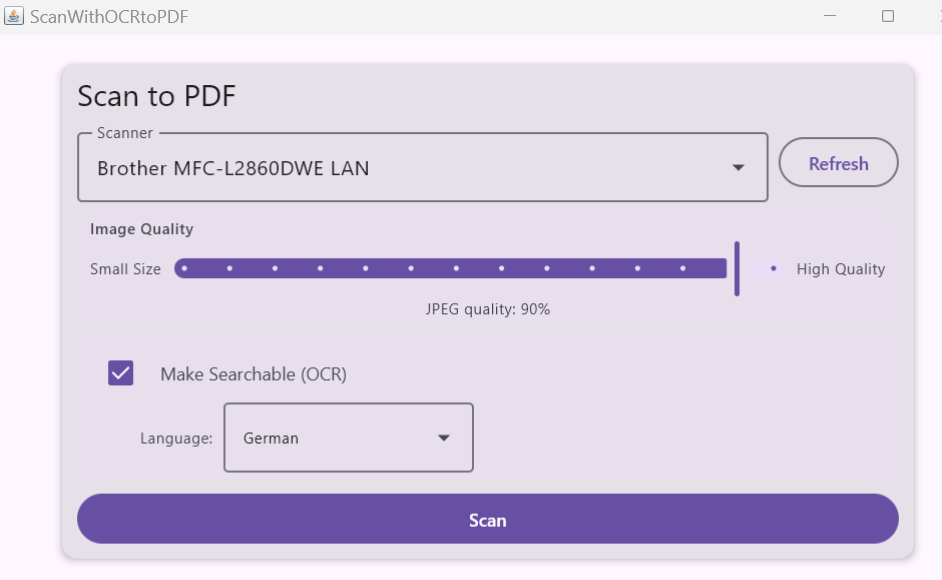
Source: github.com/jimandreas/ScanWithOCRtoPDF
What It Does
ScanWithOCRtoPDF is a single-purpose Windows desktop application: feed it a WIA-compatible scanner, click Scan, get back a searchable PDF. No document management, no cloud sync — just a clean pipeline from scanner to file.
Key features:
- One-click scanning via the WIA system dialog (scanner settings controlled by the driver)
- Automatic Tesseract OCR with 12 supported languages (English, French, German, Spanish, Italian, Portuguese, Dutch, Polish, Russian, Japanese, Korean, Arabic)
- PDF/A-1b compliant output with invisible per-word text overlay for accurate search highlighting
- Multi-page batch scanning with “Scan More Pages / Done” prompt between pages
- Quality slider mapping to JPEG compression (0.30–0.95 range)
- Cancel button with temp-file cleanup
- MSI installer bundling JRE 17, all dependencies, and tessdata — no separate Java install needed
Technology Stack
| Layer | Choice |
|---|---|
| UI framework | Compose for Desktop 1.8.2 (Material3) |
| Language | Kotlin JVM 2.2.21 |
| Scanner integration | WIA 2.0 COM via JNA 5.18.1 vtable bindings |
| OCR | Tess4J 5.18.0 (Tesseract LSTM engine) |
| PDF generation | Apache PDFBox 3.0.6 with XMP metadata |
| Concurrency | Kotlinx Coroutines 1.10.2 |
| Distribution | Compose jpackage → MSI/EXE |
The most interesting integration challenge was WIA 2.0. The Windows Image Acquisition automation layer (wiaaut.dll) was removed from modern Windows, so the app talks directly to the COM interfaces — IWiaDevMgr2, IEnumWIA_DEV_INFO, IWiaPropertyStorage — via manually constructed JNA vtable bindings.
Architecture
The scan pipeline runs across three coroutine dispatchers:
User clicks "Scan"
  ↓
AppState.startScan()
  ├─ Dispatchers.IO (WIA STA thread)
  │  └─ IWiaDevMgr2::GetImageDlg — blocks on WIA dialog
  │     returns List<ScannedPage> with image + actual DPI from file metadata
  │
  ├─ "Scan More Pages?" dialog (repeat as needed)
  │
  ├─ Dispatchers.Default (CPU-bound)
  │  ├─ ImageProcessor.toJpegBytes() — per page
  │  ├─ TesseractOcrEngine.recognizePage() — per page
  │  │  returns List<OcrWord> with bounding boxes
  │  └─ PdfBuilder.build()
  │     ├─ sRGB ICC OutputIntent (PDF/A-1b)
  │     ├─ JPEG image layer (visible)
  │     └─ Invisible text overlay at exact word positions
  │
  └─ Dispatchers.Main — success dialog with "Open PDF"
One constraint dominated the WIA layer: all COM calls must run on a single dedicated STA (Single-Threaded Apartment) thread initialized with CoInitializeEx(COINIT_APARTMENTTHREADED). Using a thread pool creates an MTA context that breaks scanner drivers with RPC_E_WRONG_THREAD. A runOnSta {} helper marshals coroutine calls onto this thread via suspendCancellableCoroutine.
Hard-Won Lessons
The project accumulated two detailed technical notes files (TECHNOTES.md and TECHNOTESOCR.md) documenting bugs invisible at compile time that only surfaced at runtime.
WIA/COM pitfalls:
CLSCTX_LOCAL_SERVERrequired for WIA Device Manager — it’s an out-of-process service. Wrong flag →0x80040154 REGDB_E_CLASSNOTREGPROPSPECstruct needs 8-byte alignment padding on 64-bit — missing padding causes property reads to silently returnVT_EMPTYBSTRvalues must be freed withOleAuto.SysFreeString(), notCoTaskMemFree()— wrong allocator causes heap corruption- The vtable index for
GetImageDlgchanged between WIA 1.0 and 2.0 (now index 10, not 7)
OCR pipeline pitfalls:
setDatapath()takes thetessdata/directory itself, not its parentBufferedImagecarries no DPI metadata; Tesseract defaults to 70 DPI and produces poor results — must callsetVariable("user_defined_dpi", dpi)with the actual scan DPI read from the saved file- Using
getWords(RIL_WORD)instead ofdoOCR()is the right approach for positioned overlays — it returns per-word bounding boxes enabling accurate search highlighting PDType0Fontwith Identity-H writes glyph IDs as character codes; NotoSans digit GIDs (4540+) decode as Hangul Jamo — fixed by switching toPDTrueTypeFont+WinAnsiEncoding
How Claude Planned and Built It
The project began with CLAUDE_PLAN.md — an implementation plan generated by Claude Code at project inception. The plan laid out:
- Technology stack rationale
- Complete package structure with file-by-file responsibilities
- Seven implementation phases: build infrastructure → WIA integration → UI → OCR → PDF → batch scanning → distribution
- Design notes and a verification checklist
The plan was then executed over a series of Claude Code sessions. The CLAUDE.md file records key architectural constraints and known technical pitfalls to keep across sessions — things like the STA thread requirement for WIA, correct CLSCTX flags, and Tesseract DPI handling.
The final implementation diverged from the original plan in a few places — IWiaDevMgr2::GetImageDlg replaced a lower-level IWiaDataTransfer::idtGetData approach, OCR switched from doOCR() to word-level bounding boxes, and AppState was split into startScan() / finalizePdf() / cancelScan() instead of a monolithic method. The plan document records all deviations with rationale.
Testing
Integration tests (ScanPipelineTest.kt) exercise the full OCR → PDF pipeline without mocking:
- Synthetic bitmaps with known text at specific positions
- Real Tesseract LSTM OCR (not mocked)
- PDF built via
PdfBuilder, read back with PDFBox - Assertions on text content and invisible overlay coordinates
Tests cover text in all four quadrants, coordinate transformation (image pixels → PDF points), table cell recognition, and German umlaut/Eszett handling.
Build
# Run from source
./gradlew run

# Run tests
./gradlew test

# Build MSI installer
./gradlew packageMsi
The MSI bundles JRE 17, all JARs, and the twelve Tesseract language data files — no separate installation needed on the target machine.
 Images generated by Google Gemini